-
 Sale!Original price was: $9.00.$8.00Current price is: $8.00.
There's always a solution…..
Advanced reporting, data exports, and automated insights to demonstrate value, optimise performance, and grow your directory business
The SFR Directory Analytics is part of a series of WordPress plugins that help WordPress website owners and developers create and improve directories – including those built with Directorist, GeoDirectory and Business Directory. The other plugins include SFR Directory category Display and SFR Directory Map.
SFR Directory Map – free version via WordPress
SFR Directory Category Display – free version via WordPress
SFR Analytics – free version via WordPress
The free version gives you beautiful dashboards, but what happens when you need to share insights with stakeholders, advertisers, or your team? Pro gives you PDF reports, CSV exports, and professional HTML summaries.
Analysing “last 30 days” is useful, but what about comparing this month to last month? Or examining seasonal trends? Or measuring the impact of a specific marketing campaign? Pro lets you filter by any date range you need.
Tired of logging in daily to check your analytics? Pro sends automated email reports directly to your inbox—weekly or monthly digests that keep you informed without the manual work.
Everything in the free version, plus the professional tools you need to demonstrate value, make strategic decisions, and present your directory professionally.
Everything in Free, plus these game-changing professional tools
Analyse any time period you need with flexible date range selection.
Export all your analytics data for deeper analysis and custom reporting.
Create professional, branded reports with charts and graphs.
More detailed insights with advanced performance indicators.
Get help when you need it with dedicated priority support.
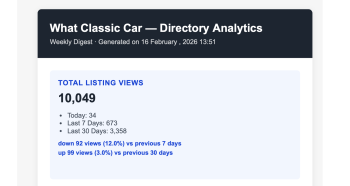
Automate your reporting with weekly or monthly email digests. Read more
“Show potential advertisers your traffic statistics—we receive 50,000+ monthly views across 500+ listings.”
Generate professional PDF reports showcasing your directory’s reach. Include view statistics, top-performing categories, and growth trends. Perfect for media kits and advertiser presentations.
“Generate monthly PDF reports for team meetings showing directory growth and top-performing categories.”
Create polished reports for stakeholders in minutes. Compare month-over-month performance, identify trends, and present data professionally with branded PDF exports.
“Filter analytics by custom date ranges to analyse the impact of marketing campaigns or seasonal trends.”
Measure the success of specific marketing campaigns by comparing performance before and after launch. Export data to CSV for detailed analysis and share results with your marketing team.
“Schedule weekly email digests to stay informed about directory performance without logging in daily.”
Receive automated reports straight to your inbox. Stay on top of your directory’s performance without manual checking. Focus on strategy while Pro handles the reporting.
Sale!No. The Pro version is a complete standalone plugin that includes everything from the free version plus all the Pro features. Simply install Pro and you’re ready to go.
No. Your existing analytics data is preserved during the upgrade. All your historical data will be immediately available in the Pro version.
Each Pro licence covers one WordPress installation. If you need to use Pro on multiple sites, you’ll need a licence for each site. Multi-site licensing options are available.
The plugin continues to work, but you won’t receive updates or support. You’ll need to renew your licence to continue receiving updates, new features, and priority support.
Yes. We offer a 30-day money-back guarantee. If you’re not satisfied with Pro for any reason, contact us within 30 days for a full refund.
SFR Directory Analytics Pro supports the same directory plugins as the free version: Directorist, GeoDirectory, and Business Directory Plugin. It automatically detects which plugins you’re using.
Configure email reports in the Pro settings to receive automated weekly or monthly summaries directly in your inbox. Reports include key metrics, top performers, and period comparisons.
Yes. Pro’s export functionality allows you to export filtered data based on your selected date ranges and view periods. Export exactly what you need for your reports and analysis.
Yes, whether you use the free or Pro plugins you can get support.
or
| Cookie | Duration | Description |
|---|---|---|
| cookielawinfo-checkbox-analytics | 11 months | This cookie is set by GDPR Cookie Consent plugin. The cookie is used to store the user consent for the cookies in the category "Analytics". |
| cookielawinfo-checkbox-functional | 11 months | The cookie is set by GDPR cookie consent to record the user consent for the cookies in the category "Functional". |
| cookielawinfo-checkbox-necessary | 11 months | This cookie is set by GDPR Cookie Consent plugin. The cookies is used to store the user consent for the cookies in the category "Necessary". |
| cookielawinfo-checkbox-others | 11 months | This cookie is set by GDPR Cookie Consent plugin. The cookie is used to store the user consent for the cookies in the category "Other. |
| cookielawinfo-checkbox-performance | 11 months | This cookie is set by GDPR Cookie Consent plugin. The cookie is used to store the user consent for the cookies in the category "Performance". |
| viewed_cookie_policy | 11 months | The cookie is set by the GDPR Cookie Consent plugin and is used to store whether or not user has consented to the use of cookies. It does not store any personal data. |